
JAMB Pexpired Error Explained: Why Your JAMB Profile Expired and the Simple Fixes You Must Try

JAMB Profile Expired (Pexpired): Meaning, Causes, and How to Fix It Fast JAMB Profile Expired (Pexpired) is an error message many candidates encounter while trying to generate their JAMB profile…
JAMB Profile Expired (Pexpired): Meaning, Causes, and How to Fix It Fast
JAMB Profile Expired (Pexpired) is an error message many candidates encounter while trying to generate their JAMB profile code using their NIN. This issue can be frustrating, especially when registration deadlines are close.
In this MMC-approved guide, you’ll clearly understand what Pexpired means, why it happens, and the exact steps to fix it successfully without stress.
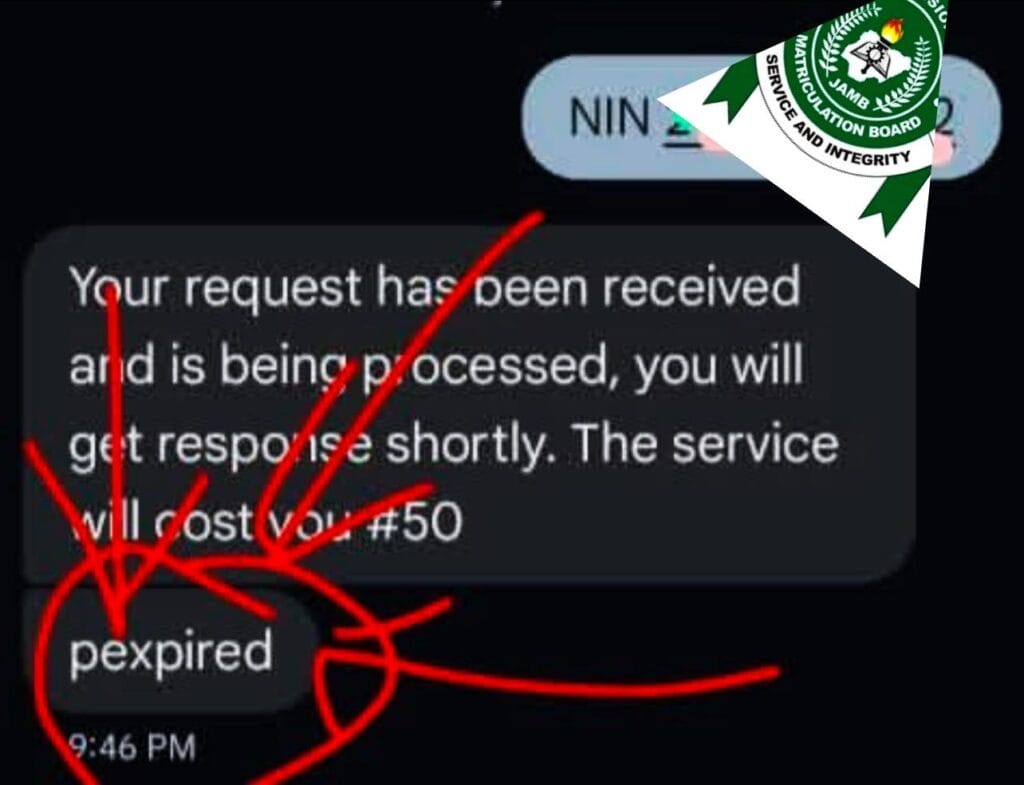
What Does “Pexpired” Mean in JAMB?
Pexpired simply means “Profile Expired.”
It indicates that the JAMB system detected an old or inactive profile previously linked to your NIN.
This usually occurs when:
You generated a JAMB profile code in a previous year
That profile is no longer valid for the current JAMB registration cycle
JAMB requires fresh profile validation every year, even if you used the same NIN before.
Why JAMB Profile Expired (Pexpired) Happens
1Previous JAMB Profile Exists
If you used your NIN to register for JAMB in past years, the system may still be holding that old profile.
Expired or Inactive JAMB Profile
JAMB profiles are year-specific. Once a registration year ends, that profile expires automatically.
Unvalidated NIN Details
If your NIN details were not properly validated at NIMC, JAMB may reject it.
SIM Card Mismatch
Using a SIM card not linked to your NIN can trigger the Pexpired error.
How to Fix JAMB Profile Expired (Pexpired)
Follow these proven solutions, arranged from simplest to strongest.
Solution 1: Wait and Retry (Recommended First)
Sometimes, the JAMB server delays updates.
- Wait 2–6 hours
Retry sending your NIN - Correct format:
NIN 12345678901
Send to 66019
Solution 2: Use the Alternative JAMB Shortcode
- If 55019 fails, try the backup shortcode:
- Send:
NIN 12345678901
To 66019 - This method has worked for many candidates facing JAMB profile expired issues.
Solution 3: Visit the Nearest NIMC Office
If the problem persists:
📱 Solution 4: Use the Same SIM Linked to Your NIN
Ensure:
The SIM used is registered with your NIN
The SIM has network service
SMS sending is active
This step alone resolves many Pexpired errors.
Important Things to Double-Check
- Before trying again, confirm that:
- Your NIN has 11 digits
SMS is sent exactly as: NIN 12345678901
No extra spaces or symbols
SIM is active and registered
Common Mistakes Candidates Make
- Sending NIN with spelling errors
Using a different phone number
Repeatedly spamming SMS without waiting
Ignoring NIMC validation - Avoiding these mistakes improves success instantly.
Is JAMB Profile Expired a Serious Problem?
- No but ignoring it is dangerous.
- The good news is:
Pexpired is fixable
But delaying can cause missed registration deadlines - That’s why MMC strongly advises resolving it early.
Final Advice from MMC
If you see JAMB Profile Expired (Pexpired):
- Stay calm
- Follow the steps above
- Validate your NIN early
- Avoid roadside agents
- JAMB registration success starts with a clean and active profile.
Conclusion
The JAMB Profile Expired (Pexpired) error is not a failure it’s simply a system check. Once your NIN is validated and linked correctly, generating your JAMB profile code becomes easy.
For more trusted JAMB updates, guides, and school news, stay connected with MMC mmcyberconet, where accuracy meets clarity.
- JAMB 2026 Exam Structure: Complete Guide Every Candidate Must Read
- JAMB HND NYSC Mobilisation Crisis: Oloyede Finally Reveals the Truth About HND Graduates’ NYSC Problems
- JAMB Direct Entry Registration 2026: Complete Step-by-Step Guide Every Candidate Must Know
- How To Know Your JAMB Examination Date, Time and Venue, Important Official Update for UTME Candidates
- No Extension Is Coming: JAMB Confirms Final Deadline for 2026 UTME Registration
